PrAide
Download
win Windows
mac Apple Silicon
mac Apple Intel

Launching Application…

Please click “Open” in the browser prompt.

Nothing happened?
Please click the download button in the top-right corner to download the client.

For the best experience, please visit psaide.com on a computer.

How to Obtain an Invitation Code

There are two methods to obtain an invitation code as outlined below.

Table of Contents

1. Discord

Get your invitation code by joining our Discord community.

(1) Open Discord and sign in to your account.

(2) Click the “+” icon on the left-hand sidebar to add a server.

Click the “+” icon on the left-hand sidebar to add a server.
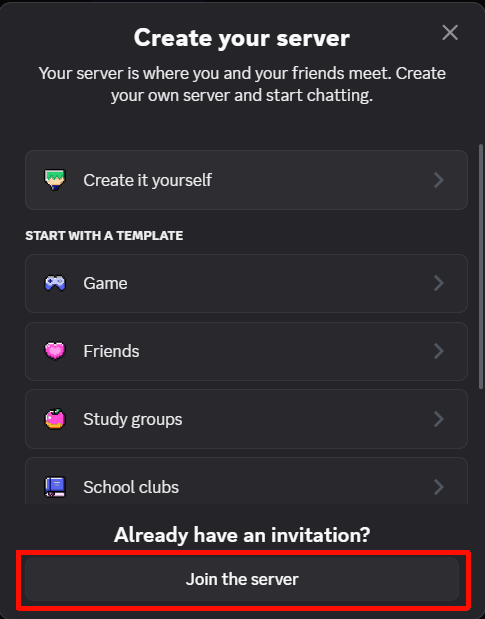
Click join the server

(3) Paste the invitation link and confirm to join the server.
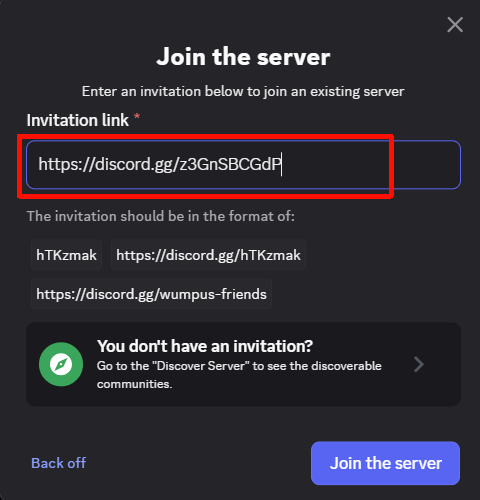
https://discord.gg/z3GnSBCGdP

Paste the invitation link and confirm to join the server.

(4)Once you have entered the server, send a message in the chat to receive your invitation code.
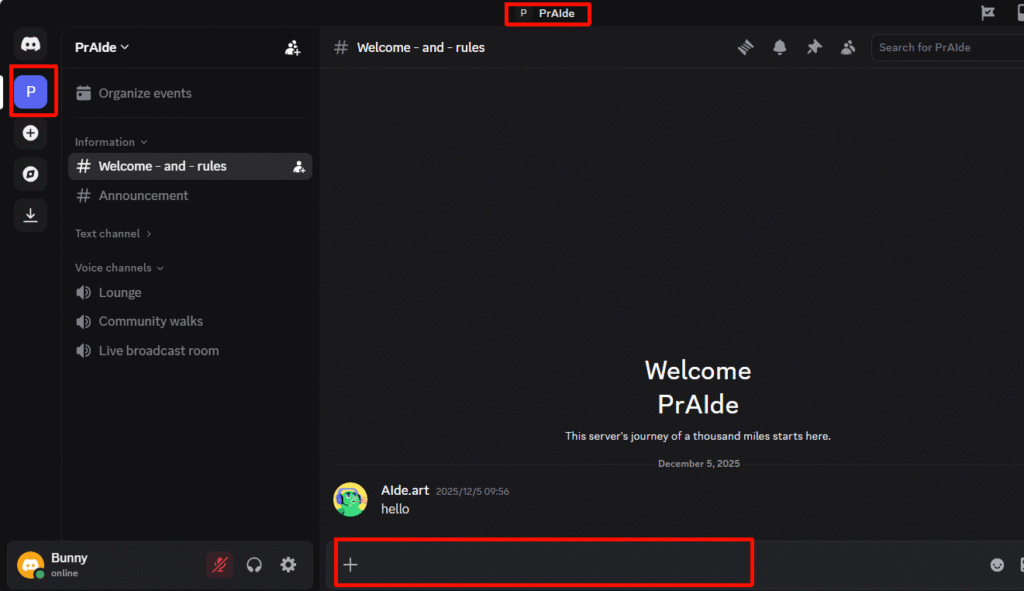
entered the server, send a message in the chat

2. Emali

Contact us at [email protected] to request an invitation code.

how to get praide

Download for Windows / Mac: 

Help: 

帮助中心

More similar articles
  • How to Enable Accessibility Permission for PrAide on Mac
  • PrAide Installation Tutorial
  • How to Obtain an Invitation Code